2020年6月

IIS默认的是SSL 2.0协议,使用了RC4加密密钥的,这样会造成PCI DSS和Apple ATS规范不及格。

我们需要禁用SSL v2.0、SSL v3.0协议和低强度加密密钥。使用TLS1.0 TLS1.1 TLS1.2版本。

这里如果要改的话,要去注册表改,很麻烦的。我找到了IIS Crypto GUI这个软件很方便就能修改。
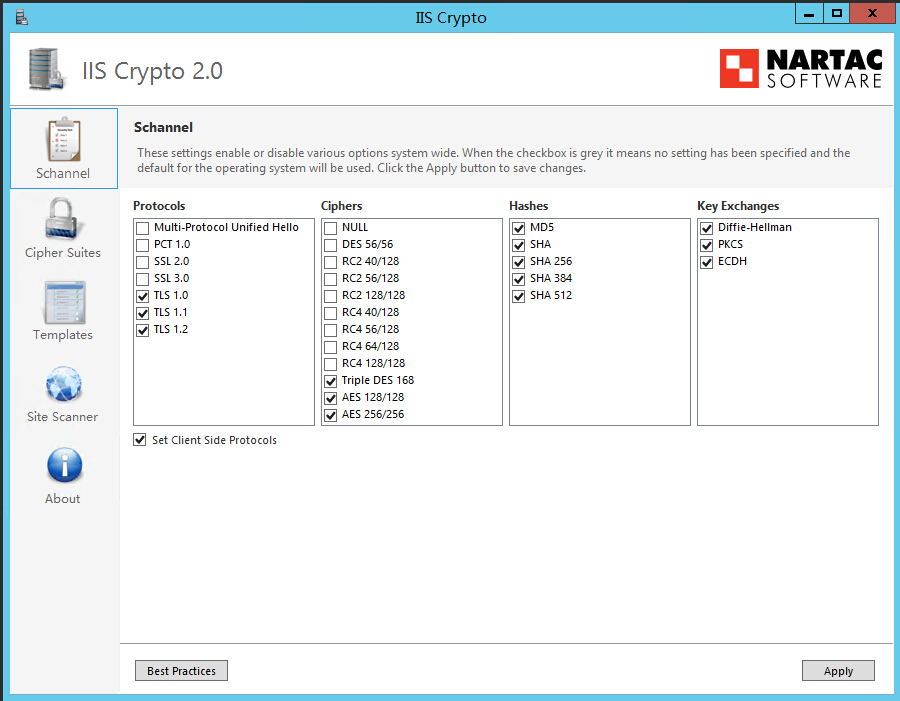
请输入图片描述

直接点“Best Practices”,推荐设置,然后点“Apply”应用即可,要重启一下系统。

软件下载地址:https://www.nartac.com/Products/IISCrypto/Download

点那个“IIS Crypto GUI”,下载,Windows还是用GUI版本吧。。

在上面如果取消TLS1.0勾选,会提示远程桌面使用该协议,需要一个安装一个补丁,有点麻烦。

我们兼容办法是这里先勾选上TLS1.0应用,重启后在到注册请去修改禁用TLS1.0协议,具体参照禁用不安全的SSL2.0和SSL3.0协议操作方式一样

相关链接:
Windows Server IIS配置 怎么禁用不安全的SSL2.0和SSL3.0协议? https://www.gworg.com/problems/548.html
IIS上部署多个SSL证书绑定https和使用TLS1.0 TLS1.1 TLS1.2协议:https://www.iamwawa.cn/blog/4-iis-ssl.html

如果https与http绑定在不同的IIS站点上,直接在https站点的web.config中添加如下配置:

<system.webServer>
    <httpProtocol>
        <customHeaders>
            <add name="Strict-Transport-Security" value="max-age=31536000" />
        </customHeaders>
    </httpProtocol>
</system.webServer>

如果在同一个IIS站点,需要针对https响应添加如下的url重写规则(详见How to enable HTTP Strict Transport Security (HSTS) in IIS7+):

<system.webServer>
    <rewrite>
        <outboundRules>
            <rule name="Add Strict-Transport-Security when HTTPS" enabled="true">
                <match serverVariable="RESPONSE_Strict_Transport_Security"
                    pattern=".*" />
                <conditions>
                    <add input="{HTTPS}" pattern="on" ignoreCase="true" />
                </conditions>
                <action type="Rewrite" value="max-age=31536000" />
            </rule>
        </outboundRules>
    </rewrite>
</system.webServer>

相关文章:
https://q.cnblogs.com/q/85129/
https://serverfault.com/questions/417173/enable-http-strict-transport-security-hsts-in-iis-7