admin 发布的文章

如果https与http绑定在不同的IIS站点上,直接在https站点的web.config中添加如下配置:

<system.webServer>
    <httpProtocol>
        <customHeaders>
            <add name="Strict-Transport-Security" value="max-age=31536000" />
        </customHeaders>
    </httpProtocol>
</system.webServer>

如果在同一个IIS站点,需要针对https响应添加如下的url重写规则(详见How to enable HTTP Strict Transport Security (HSTS) in IIS7+):

<system.webServer>
    <rewrite>
        <outboundRules>
            <rule name="Add Strict-Transport-Security when HTTPS" enabled="true">
                <match serverVariable="RESPONSE_Strict_Transport_Security"
                    pattern=".*" />
                <conditions>
                    <add input="{HTTPS}" pattern="on" ignoreCase="true" />
                </conditions>
                <action type="Rewrite" value="max-age=31536000" />
            </rule>
        </outboundRules>
    </rewrite>
</system.webServer>

相关文章:
https://q.cnblogs.com/q/85129/
https://serverfault.com/questions/417173/enable-http-strict-transport-security-hsts-in-iis-7

@echo off
echo 当前的盘符:%~d0
echo 当前的盘符及路径:%cd%
echo 当前的盘符及路径:%~dp0
echo 当前的盘符及路径的短文件名格式:%~sdp0
echo 当前批处理文件名:%~n0
color 0a 
TITLE 添加用户环境变量
echo.
REM 获取当前目录路径
set CURRENT_PATH=%~sdp0
if "%CURRENT_PATH:~-1%"=="\"  set CURRENT_PATH=%CURRENT_PATH:~0,-1%
REM 获取当前用户环境变量
set USER_PATH=
for /f "tokens=1,2,* " %%i in ('REG QUERY "HKEY_CURRENT_USER\Environment" /v Path ^| find /i "Path"') do (set USER_PATH=%%k)
REM 判断当前用户环境变量是否包含当前目录路径
echo %USER_PATH%|find /i "%CURRENT_PATH%" && set IsNull=true|| set IsNull=false
if %IsNull%==true (
    echo 用户环境变量包含当前路径,不追加
) else (
    echo 用户环境变量不包含当前路径,执行
    if not defined USER_PATH (
        echo 用户环境变量是空的,赋值
        setx Path %CURRENT_PATH%
    ) else (
        echo 用户环境变量不是空的,追加
        setx Path %USER_PATH%;%CURRENT_PATH%
    )
)
echo.
echo 用户环境变量已添加
echo.
pause

在win7上测试通过

在VM虚拟机中安装CentOS 7 时 有时候顾虑到电脑硬件性能,我们需要最小化安装,而最小化安装后与centos6的版本是有一些差异的,接下来我们就对刚安装好的最小化centos7做一些操作,来世我们使用的更得心应手。

1.最小化安装CentOS7,首先需要配置网络,和6系列一样

vi /etc/sysconfig/network-scripts/ifcfg-eno16777736

这里的eno16777736是你的网卡名称,(我使用的是NAT模式,桥接模式自行修改IP地址)修改文件中

ONBOOT = no 为 
ONBOOT = yes

2.启用你的网卡。
桥接模式修改IP地址百度一大堆,这里不再赘述。

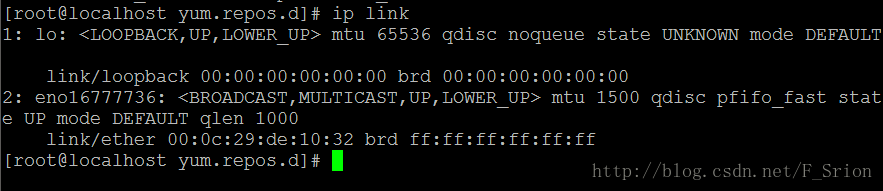
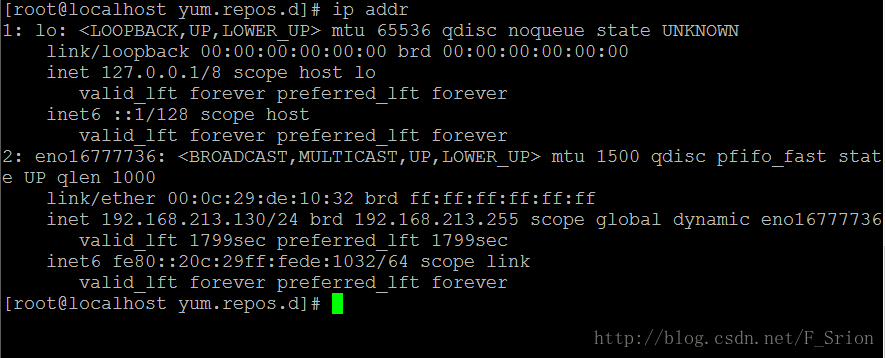
最小化安装CentOS7后,在配置网络后,想查看我的IP,发现 ifconfig 命令是不好使得。在最小化的CentOS7中,查看网卡信息的命令应该是

ip addr 
请输入图片描述

查看网络统计信息是

ip link,

请输入图片描述

为了方便起见 我们还是启用ifconfig 命令。
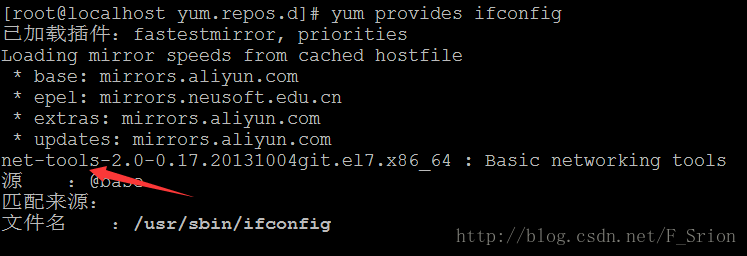
首先我们看看,是哪个组件包含了ifconfig命令,用

yum provides ifconfig 
或 
yum whatprovides ifconfig 来查看
请输入图片描述

我们可以看到 ifconfig 命令是依赖于 net-tools 软件的 ,所以我们

yum install -y net-tools

安装该软件, 好了 现在 ifconfig 是不是能正常使用了!

3.下一步我们就要关闭CentOS7自带的防火墙 firewall 启用 IPtable
停止 Firewall

systemctl stop firewalld

关闭firewall自动启动

systemctl disable firewalld.service 
安装IPtables防火墙 
yum install -y iptables-services

修改iptables配置文件,开放以下端口 (默认开启了22端口,以便putty等软件的连接,实例开启80端口和3306端口,以便后期lamp环境使用,注:80 为Apache默认端口,3306为MySQL的默认端口)

vi /etc/sysconfig/iptables 
#添加下面三句话到默认的22端口这条规则的下面 
-A INPUT -m state –state NEW -m tcp -p tcp –dport 80 -j ACCEPT 
-A INPUT -m state –state NEW -m tcp -p tcp –dport 3306 -j ACCEPT

修改后的iptables配置文件:

# sample configuration for iptables service 
# you can edit this manually or use system-config-firewall 
# please do not ask us to add additional ports/services to this default configuration 
*filter 
:INPUT ACCEPT [0:0] 
:FORWARD ACCEPT [0:0] 
:OUTPUT ACCEPT [0:0] 
-A INPUT -m state –state RELATED,ESTABLISHED -j ACCEPT 
-A INPUT -p icmp -j ACCEPT 
-A INPUT -i lo -j ACCEPT 
-A INPUT -p tcp -m state –state NEW -m tcp –dport 22 -j ACCEPT 
-A INPUT -m state –state NEW -m tcp -p tcp –dport 80 -j ACCEPT 
-A INPUT -m state –state NEW -m tcp -p tcp –dport 3306 -j ACCEPT 
-A INPUT -j REJECT –reject-with icmp-host-prohibited 
-A FORWARD -j REJECT –reject-with icmp-host-prohibited 
COMMIT

重启iptables

systemctl restart iptables.service 
添加iptables开机自启项 
systemctl enable iptables.service

4.关闭SELINUX
编辑SELINUX配置文件

vi /etc/selinux/config 
#注释掉下面两行 
#SELINUX=enforcing 
#SELINUXTYPE=targeted 
#增加一行 
SELINUX=disabled

保存,关闭

setenforce 0 
使设置启用,在这里最好重启一下系统,也可以稍后重启

5.CentOS7最小化安装后没有wget软件,但是以后我们会经常用到这个组件,所以我们安装一下

yum install -y wget

6.CentOS自带的国外源有时候会很慢,我们替换成国内的阿里源,也有很多比如163源都很好,国内很多人用,但这里我们就用阿里源做个示例,想用其他源的同学可以去百度一下。

#先进入源的目录 
cd /etc/yum.repo.d 
#备份一下官方源 
mv CentOS-Base.repo CentOS-Base.repo.bak 
#将阿里源文件下载下来 
wget -O /etc/yum.repos.d/CentOS-Base.repo http://mirrors.aliyun.com/repo/Centos-7.repo 
#重建源数据缓存 
yum makecache 
ok,换源完成

7.CentOS自带vi编辑器,功能没有vim强大,我么再安装一个vim编辑器

yum install -y vim-enhanced

大功告成,现在我们的最小化CentOS7已经可以得心应手的使用了!
————————————————
原文链接:https://blog.csdn.net/f_srion/article/details/54910943

Nginx配置WebSocket反向代理
问题描述

目前项目中需要使用到WebSocket来进行通讯,所以就写了个Nginx反向代理WebSocket的配置文件.

很简单,但是很有效,能够横向扩展WebSocket服务端

先直接展示配置文件,如下(使用的话直接复制,然后改改ip和port即可)

map $http_upgrade $connection_upgrade { 
    default upgrade; 
    '' close; 
} 
upstream wsbackend{ 
    server ip1:port1; 
    server ip2:port2; 
    keepalive 1000; 
} 
 
server { 
    listen 20038; 
    location /{ 
        proxy_http_version 1.1; 
        proxy_pass http://wsbackend; 
        proxy_redirect off; 
        proxy_set_header Host $host; 
        proxy_set_header X-Real-IP $remote_addr; 
        proxy_read_timeout 3600s; 
        proxy_set_header X-Forwarded-For $proxy_add_x_forwarded_for; 
        proxy_set_header Upgrade $http_upgrade; 
        proxy_set_header Connection $connection_upgrade; 
    } 
}

首先:

map $http_upgrade $connection_upgrade { 
    default upgrade; 
    '' close; 
} 
 
表示的是 
1. 如果 $http_upgrade 不为 '' (空),则 $connection_upgrade 为 upgrade 
2. 如果 $http_upgrade 为 '' (空),则 $connection_upgrade 为 close

其次:

upstream wsbackend{ 
    server ip1:port1; 
    server ip2:port2; 
    keepalive 1000; 
} 
 
表示的是 nginx负载均衡 
1. 两台服务器 (ip1:port1)和(ip2:port2) 
2. keepalive 1000 表示的是每个nginx进程中上游服务器保持的空闲连接,当空闲连接过多时,会关闭最少使用的空闲连接.当然,这不是限制连接总数的,可以想象成空闲连接池的大小.设置的值应该是上游服务器能够承受的

最后:

server { 
    listen 20038; 
    location /{ 
        proxy_http_version 1.1; 
        proxy_pass http://wsbackend; 
        proxy_redirect off; 
        proxy_set_header Host $host; 
        proxy_set_header X-Real-IP $remote_addr; 
        proxy_read_timeout 3600s; 
        proxy_set_header X-Forwarded-For $proxy_add_x_forwarded_for; 
        proxy_set_header Upgrade $http_upgrade; 
        proxy_set_header Connection $connection_upgrade; 
    } 
} 
 
表示的是监听的服务器的配置 
1. listen 20038 表示 nginx 监听的端口 
2. locations / 表示监听的路径(/表示所有路径,通用匹配,相当于default) 
3. proxt_http_version 1.1 表示反向代理发送的HTTP协议的版本是1.1,HTTP1.1支持长连接 
4. proxy_pass http://wsbackend; 表示反向代理的uri,这里可以使用负载均衡变量 
5. proxy_redirect off; 表示不要替换路径,其实这里如果是/则有没有都没关系,因为default也是将路径替换到proxy_pass的后边 
6. proxy_set_header Host $host; 表示传递时请求头不变, $host是nginx内置变量,表示的是当前的请求头,proxy_set_header表示设置请求头 
7. proxy_set_header X-Real-IP $remote_addr; 表示传递时来源的ip还是现在的客户端的ip 
8. proxy_read_timeout 3600s; 表的两次请求之间的间隔超过 3600s 后才关闭这个连接,默认的60s.自动关闭的元凶 
9. proxy_set_header X-Forwarded-For $proxy_add_x_forwarded_for; 表示X-Forwarded-For头不发生改变 
10. proxy_set_header Upgrade $http_upgrade; 表示设置Upgrade不变 
11. proxy_set_header Connection $connection_upgrade; 表示如果 $http_upgrade为upgrade,则请求为upgrade(websocket),如果不是,就关闭连接

相关文章:
https://blog.csdn.net/l1028386804/article/details/86649543
https://www.cnblogs.com/kevingrace/p/9512287.html

#目录反向代理
location ^~ /abc/
{
    #反向代理地址,最后需要有斜杠
    proxy_pass http://127.0.0.1:8080/tp/public/;
    proxy_set_header X-Real-IP $remote_addr;
    proxy_set_header X-Forwarded-For $proxy_add_x_forwarded_for;
    #代理设置来路地址
    proxy_set_header Referer http://127.0.0.1:8080/tp/public/;
    #代理设置主机地址
    proxy_set_header Host 127.0.0.1:8080;
    proxy_set_header Accept-Encoding "";
    #代理设置页面中替换内容
    sub_filter /tp/public/ /abc/;
    #代理设置页面中批量替换内容,否则只替换第一个
    sub_filter_once off;
}

相关文章:

nginx之location的匹配规则
https://www.cnblogs.com/jiangyang/p/8485046.html