分类 iis 下的文章

首先需求是这样的:需要根据用户输入的域名或IP(内网或外网)来加载不同的静态资源。

之前功能是好的,最近使用了iis做反向代理发现获取到的是服务器的IP,排查了好久才找到原因出在反向代理上:

  • 代理为了提高性能,一些Http头部信息不回转发给后台服务器,其中就包括代理服务器的host信息,而tomcat中对于request.getServerName()的实现,就是取这个host信息,如果http
    header总没设置,则取应用所在服务器IP地址。

所以,需要设置下让代理服务器把Host转发给后台服务器。网上类似的资料都是apache和nginx的解决方法,iis的资料很少,搜了好久才找到,这里总结下:

1、apache:在<VirtualHost/>标签中的最后添加 ProxyPreserveHost on

<VirtualHost *:80>
    RewriteEngine on
    ProxyPass /TLimages/ !
    ProxyPass /imagelist/ !
    ProxyPass /xiazai/ !
    ProxyPass /ad/ !
    ProxyPass / balancer://proxy/
    ProxyPassReverse / balancer://proxy/
    ProxyPreserveHost on
</VirtualHost>

2、nginx:在location {…}中添加 proxy_set_header Host $host

location ^~/proxy_path/ {
    root "/www/html";
    index index.html;
    proxy_pass http://192.168.223.137/;
    proxy_set_header Host $host;
    proxy_set_header X-Real-IP $remote_addr;
    proxy_set_header X-Forwarded-For $proxy_add_x_forwarded_for;
}

3、iis:设置preserveHostHeader:true

%windir%\system32\inetsrv\appcm d.exe set config -section:system.webServer/proxy -preserveHostHeader:true /commit:apphost
相关文章:http://www.yyjjssnn.cn/articles/842.html

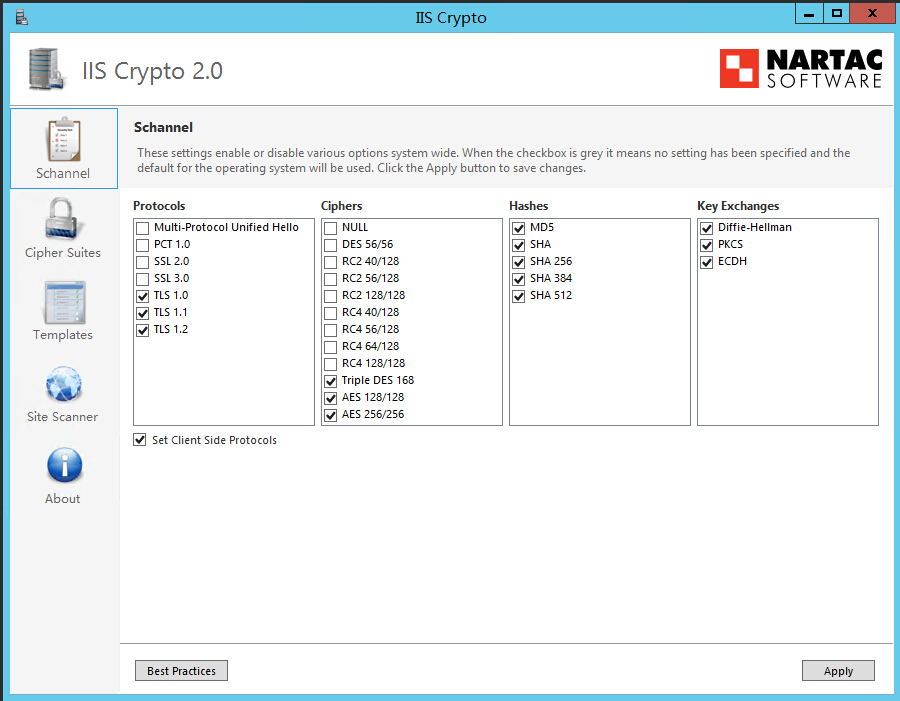
IIS默认的是SSL 2.0协议,使用了RC4加密密钥的,这样会造成PCI DSS和Apple ATS规范不及格。

我们需要禁用SSL v2.0、SSL v3.0协议和低强度加密密钥。使用TLS1.0 TLS1.1 TLS1.2版本。

这里如果要改的话,要去注册表改,很麻烦的。我找到了IIS Crypto GUI这个软件很方便就能修改。

请输入图片描述

直接点“Best Practices”,推荐设置,然后点“Apply”应用即可,要重启一下系统。

软件下载地址:https://www.nartac.com/Products/IISCrypto/Download

点那个“IIS Crypto GUI”,下载,Windows还是用GUI版本吧。。

在上面如果取消TLS1.0勾选,会提示远程桌面使用该协议,需要一个安装一个补丁,有点麻烦。

我们兼容办法是这里先勾选上TLS1.0应用,重启后在到注册请去修改禁用TLS1.0协议,具体参照禁用不安全的SSL2.0和SSL3.0协议操作方式一样

相关链接:
Windows Server IIS配置 怎么禁用不安全的SSL2.0和SSL3.0协议? https://www.gworg.com/problems/548.html
IIS上部署多个SSL证书绑定https和使用TLS1.0 TLS1.1 TLS1.2协议:https://www.iamwawa.cn/blog/4-iis-ssl.html

如果https与http绑定在不同的IIS站点上,直接在https站点的web.config中添加如下配置:

<system.webServer>
    <httpProtocol>
        <customHeaders>
            <add name="Strict-Transport-Security" value="max-age=31536000" />
        </customHeaders>
    </httpProtocol>
</system.webServer>

如果在同一个IIS站点,需要针对https响应添加如下的url重写规则(详见How to enable HTTP Strict Transport Security (HSTS) in IIS7+):

<system.webServer>
    <rewrite>
        <outboundRules>
            <rule name="Add Strict-Transport-Security when HTTPS" enabled="true">
                <match serverVariable="RESPONSE_Strict_Transport_Security"
                    pattern=".*" />
                <conditions>
                    <add input="{HTTPS}" pattern="on" ignoreCase="true" />
                </conditions>
                <action type="Rewrite" value="max-age=31536000" />
            </rule>
        </outboundRules>
    </rewrite>
</system.webServer>

相关文章:
https://q.cnblogs.com/q/85129/
https://serverfault.com/questions/417173/enable-http-strict-transport-security-hsts-in-iis-7

首先检查您的PHP是线程安全性的还是非安全性的,因为我们需要知道要下载正确的模块。你可以在Windows中运行一个简单的命令来检查这个。代码如下:

php -i | findstr "Thread"

如果结果输出是Thread Safety => enabled,那说明你的PHP版本是线程安全性的,反之亦然。
当然你也可以新建个PHP文件,用php_info();来获取你PHP的信息。

接下来,在Jan-E这里下载完整的编译好的PHP版本:
https://www.apachelounge.com/viewtopic.php?t=6359
然后你可以从里面提取出你需要的文件,将它们解压到各自的文件夹中:
\php\ 文件夹:

  • v8.dll
  • v8_libbase.dll
  • v8_libplatform.dll
  • icui18n.dll (php7)
  • icuuc.dll (php7)

\php\ext\文件夹:

  • php_v8js.dll

还有最后一步,配置你的php.ini文件:

; V8 Javascript Engine Module
extension=php_v8js.dll

最后重启你的服务就可以了!!!

提供个简单的例子:

<?php

$v8 = new V8Js();

/* basic.js */
$JS = <<< EOT

var string1 = 'Hello' + ' ' + 'World!';
len = print(string1+"\\n");
var string2 = 'Hello' + ' ' + 'World2!';
len2 = print(string2+"\\n");
string1+","+string2;
EOT;

try {
  $temp = $v8->executeString($JS, 'basic.js');
  $temp = explode(",",$temp);
  print_r($temp);
} catch (V8JsException $e) {
  print_r($e);
}

运行结果如下:

[Running] php "e:worktest.php"
Hello World!
Hello World2!
Array
(

[0] => Hello World!
[1] => Hello World2!
)

[Done] exited with code=0 in 0.622 seconds
按照上面的方法设置后在windows + iis + php 环境可用。
如果使用的是apache,则需要把复制到\php\同目录下的几个文件复制到apache\bin目录下才行。

windows的%windows%/temp需要iis权限
thinkphp的临时文件目录需要iis权限

添加mime类型

//用于databalse国际语言调用
.json  application/x-javascript
//图标文件
.woff  font/x-woff
.woff2  font/x-woff

如果php需要链接mssql数据库还要安装mssql数据odb支持

  • 1、安装msodbcsql.msi
  • 2、php7还需要单下载对应版本支持的dll
    php_pdo_sqlsrv_72_nts_x64.dll 和 php_sqlsrv_72_nts_x64.dll